HomeAccueil / ExamplesExemples
Chromatic aberrationAberration chromatique
The three colour channels are read at slightly different distances from the centre, like a cheap lens.Les trois canaux de couleur sont lus à des distances du centre légèrement différentes, comme dans une lentille bon marché.
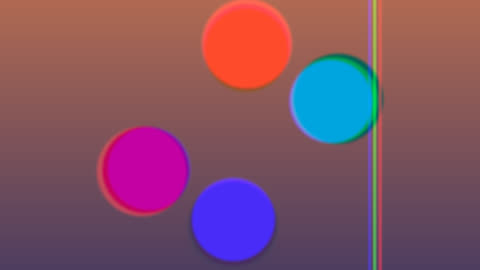
CategoryCatégorie: Post-processingPost-traitement - aberration_chromatique.glsl - 24 lineslignes - File on GitHubFichier sur GitHub
In the program: Examples, choose it, Add to the list. Or copy the code into a file next to the program and drop it on the window.Dans le programme : Exemples, choisissez-le, Ajouter à la liste. Ou copiez le code dans un fichier et glissez-le sur la fenêtre.
CodeCode
aberration_chromatique.glsl
// SPDX-License-Identifier: GPL-3.0-or-later
// Copyright (C) 2026 Patrick JAILLET

// fr: Aberration chromatique — Les trois canaux de couleur sont lus à des distances du centre légèrement différentes, comme dans une lentille bon marché.
// en: Chromatic aberration — The three colour channels are read at slightly different distances from the centre, like a cheap lens.

vec3 scene(vec2 uv) {
    float a = iTime * 0.5;
    vec3 col = mix(vec3(0.1, 0.15, 0.4), vec3(0.9, 0.5, 0.3), uv.y * 0.5 + 0.5);
    for (int i = 0; i < 4; i++) {
        float f = float(i);
        vec2 c = 0.35 * vec2(cos(a + f * 1.57), sin(a * 1.3 + f * 1.57));
        col = mix(col, 0.5 + 0.5 * cos(f + vec3(0.0, 2.0, 4.0)), smoothstep(0.17, 0.15, length(uv - c)));
    }
    col = mix(col, vec3(1.0), smoothstep(0.012, 0.0, abs(uv.x - 0.5 * sin(a))) * 0.6);
    return col;
}
void mainImage(out vec4 fragColor, in vec2 fragCoord) {
    vec2 uv = (fragCoord - 0.5 * iResolution.xy) / iResolution.y;
    float k = 0.06 * (0.6 + 0.4 * sin(iTime));
    vec3 col = vec3(scene(uv * (1.0 - k)).r, scene(uv).g, scene(uv * (1.0 + k)).b);
    fragColor = vec4(col, 1.0);
}